ONLINE BOOKING SYSTEM
Booking a Rink
We use an online booking system to book a rink to play on our Green, be it a tie, bounce game, roll-up or competition.
Full members will be given a login username and password upon joining.
New Full members with no prior bowling experience will be given their login details once they have been signed off by the Coaching team.
Please contact the Secretary or Match Secretary if you have any problems using the system. Their contact details can be found on the Contact Us page.
Please remember that you are not booking a specific rink but a time slot only.
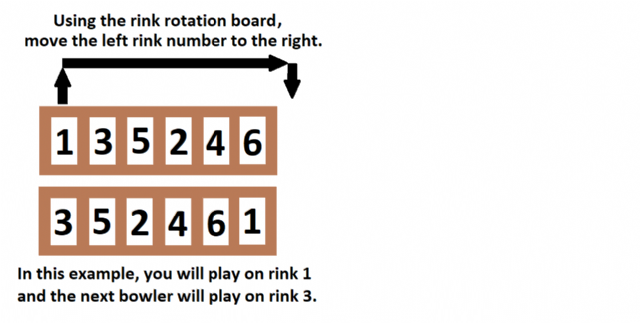
Always use the rink rotation board to select a rink to play on.
Selecting a Rink (using rink rotation board)
Please do not change the order of the rink markers. They are provided to ensure even green usage.
If there are no free rinks then you may have to wait until the next rink is available - please be patient as, occasionally, games do overrun.
Note that if a rink marker is missing or coloured "red" then that rink must NOT be played on (it may be reserved, damaged or otherwise unsafe for play).